Error Servidor AWS

Status
Cerrado para nuevas respuestas.

izan Gastecom

Silver Partner
Advanced Certified
Registrado
24 Aug 2021
Mensajes
97
Hola, tras la ultima actualización en instalcias de AWS en España han dejado de funcionar la mitad de las instancias Auto hospedado. Al acceder en las centralitas aparece un mensaje de "Error de Servidor".
Tras la imposibilidad de poder recuperar el servicio he creado una nueva instancia en España y Paris. Con el error de que no puedo acceder a través del puerto 80 ni del 5015 para poder realizar la restauración.
Al final lo he logrado creando una instancia en Londres y accediendo a la DNS de IPv4 pública mediante http y el puerto 5015.

Insto a 3CX a restablecer la normalidad en estos errores comentados y realizar pruebas antes de actualizar centralitas en producción.
 
Hola Izan, sobre las centrales que obtuviste el error cuál es la salida de estos comandos

systemctl list-units 3CX* nginx* postgre*

apt-cache policy postgresql
 
Estos son los mensajes:

$ systemctl list-units 3CX* nginx* postgre*
UNIT LOAD ACTIVE SUB DESCRIPTION
nginx.service loaded active running A high performance web server and a reverse prox
postgresql.service loaded active exited PostgreSQL RDBMS
[email protected] loaded active running PostgreSQL Cluster 11-main

LOAD = Reflects whether the unit definition was properly loaded.
ACTIVE = The high-level unit activation state, i.e. generalization of SUB.
SUB = The low-level unit activation state, values depend on unit type.

3 loaded units listed. Pass --all to see loaded but inactive units, too.
To show all installed unit files use 'systemctl list-unit-files'.
$
------------------------------------------
$ apt-cache policy postgresql
postgresql:
Installed: 11+200+deb10u5
Candidate: 11+200+deb10u5
Version table:
*** 11+200+deb10u5 500
500 http://repo.3cx.com/debian/1807 buster/main amd64 Packages
100 /var/lib/dpkg/status
11+200+deb10u4 500
500 http://repo.3cx.com/debian/1807 buster/main amd64 Packages
$
 
Hola Izan, vos llegaste a recibir algún mensaje de log de actualización no satisfactoria?

Al ejecutar systemctl status 3CX* postgre* ngin*

observaste algún servicio detenido o con timeout?
 
Hola Alejandro, no recibí ningún email de actualización satisfactoria, vi los troncales inactivos y al acceder a la PBX me saltaba este error:

1680010360289.png

Al ejecutar el comando indicado esto es lo que me responde:
$ systemctl status 3CX* postgre* ngin*
● nginx.service - A high performance web server and a reverse proxy server
Loaded: loaded (/lib/systemd/system/nginx.service; enabled; vendor preset: en
Active: active (running) since Tue 2023-03-28 12:57:37 CEST; 2h 35min ago
Docs: man:nginx(8)
Process: 513 ExecStartPre=/usr/sbin/nginx -t -q -g daemon on; master_process o
Process: 574 ExecStart=/usr/sbin/nginx -g daemon on; master_process on; (code=
Main PID: 579 (nginx)
Tasks: 3 (limit: 1116)
Memory: 21.3M
CGroup: /system.slice/nginx.service
├─579 nginx: master process /usr/sbin/nginx -g daemon on; master_proc
├─580 nginx: worker process
└─581 nginx: worker process

● postgresql.service - PostgreSQL RDBMS
Loaded: loaded (/lib/systemd/system/postgresql.service; enabled; vendor prese
Active: active (exited) since Tue 2023-03-28 12:57:39 CEST; 2h 35min ago
Process: 641 ExecStart=/bin/true (code=exited, status=0/SUCCESS)
Main PID: 641 (code=exited, status=0/SUCCESS)

[email protected] - PostgreSQL Cluster 11-main
Loaded: loaded (/lib/systemd/system/[email protected]; enabled-runtime; ven
Active: active (running) since Tue 2023-03-28 12:57:39 CEST; 2h 35min ago
lines 1-23...skipping...
● nginx.service - A high performance web server and a reverse proxy server
Loaded: loaded (/lib/systemd/system/nginx.service; enabled; vendor preset: en
Active: active (running) since Tue 2023-03-28 12:57:37 CEST; 2h 35min ago
Docs: man:nginx(8)
Process: 513 ExecStartPre=/usr/sbin/nginx -t -q -g daemon on; master_process o
Process: 574 ExecStart=/usr/sbin/nginx -g daemon on; master_process on; (code=
Main PID: 579 (nginx)
Tasks: 3 (limit: 1116)
Memory: 21.3M
CGroup: /system.slice/nginx.service
├─579 nginx: master process /usr/sbin/nginx -g daemon on; master_proc
├─580 nginx: worker process
└─581 nginx: worker process

● postgresql.service - PostgreSQL RDBMS
Loaded: loaded (/lib/systemd/system/postgresql.service; enabled; vendor prese
Active: active (exited) since Tue 2023-03-28 12:57:39 CEST; 2h 35min ago
Process: 641 ExecStart=/bin/true (code=exited, status=0/SUCCESS)
Main PID: 641 (code=exited, status=0/SUCCESS)

[email protected] - PostgreSQL Cluster 11-main
Loaded: loaded (/lib/systemd/system/[email protected]; enabled-runtime; ven
Active: active (running) since Tue 2023-03-28 12:57:39 CEST; 2h 35min ago
Process: 525 ExecStart=/usr/bin/pg_ctlcluster --skip-systemctl-redirect 11-mai
Main PID: 586 (postgres)
Tasks: 7 (limit: 1116)
Memory: 35.0M
CGroup: /system.slice/system-postgresql.slice/[email protected]
├─586 /usr/lib/postgresql/11/bin/postgres -D /var/lib/postgresql/11/m
├─607 postgres: 11/main: checkpointer
├─608 postgres: 11/main: background writer
├─609 postgres: 11/main: walwriter
├─610 postgres: 11/main: autovacuum launcher
├─611 postgres: 11/main: stats collector
└─612 postgres: 11/main: logical replication launcher
~
 
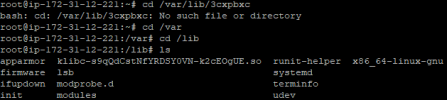
Podés ver si en esta ruta tenés un archivo llamado updater.log

/var/lib/3cxpbxc/updater.log
 
No existe el directorio en la ruta que me indicas:

1680012496882.png
 
se me fue una c

el directorio es /var/lib/3cxpbx/updater.log
 
No me aparece ese documento:
1680012998036.png
 
como llegarón a instalar esa central? hicieron alguna instalación manual?

hubo alguna actualización que hicieron manual en el servidor?
 
Podés revisar lo siguiente


systemctl is-enabled 3CXIVR01.service
systemctl is-enabled 3CXPhoneSystem01.service
systemctl is-enabled 3CXMediaServer.service
systemctl is-enabled 3CXCallFlow01.service
systemctl is-enabled 3CXFirewall.service
systemctl is-enabled 3CXAudioProvider01.service
systemctl is-enabled 3CXCfgServ01.service
systemctl is-enabled 3CXEventNotificationManager.service
systemctl is-enabled 3CXSystemService01.service
systemctl is-enabled 3CXGatewayService.service
systemctl is-enabled 3CXPhoneSystemMC01.service
systemctl is-enabled 3CXQueueManager01.service
systemctl is-enabled nginx.service

si alguno está desactivado ingresa lo siguiente


systemctl enable 3CXIVR01.service
systemctl enable 3CXPhoneSystem01.service
systemctl enable 3CXMediaServer.service
systemctl enable 3CXCallFlow01.service
systemctl enable 3CXFirewall.service
systemctl enable 3CXAudioProvider01.service
systemctl enable 3CXCfgServ01.service
systemctl enable 3CXEventNotificationManager.service
systemctl enable 3CXSystemService01.service
systemctl enable 3CXGatewayService.service
systemctl enable 3CXPhoneSystemMC01.service
systemctl enable 3CXQueueManager01.service
systemctl enable nginx


además, hay algún archivo core /var/lib/3cxpbx ?
 
Hay bastantes en disabled. Voy a esperar a que pase un tiempo en el que no esté en producción la centralita de Backup antes de habilitar los servicios y que entre en producción la PBX principal.

1680013953559.png
 
una vez los actives reinicia el servidor.
 
Después de activar los servicios y reiniciar el servidor ya he podido acceder y recuperar el control de la centralita.
Me indica la centralita que debo actualizar a esta versión.
1680030496452.png
Pero a la hora de actualizar no lo hace enviándome este update.log

Hit:1 http://repo.3cx.com/debian/1807 buster InRelease
Hit:2 http://repo.3cx.com/debian-security/1807 buster InRelease
Hit:3 http://repo.3cx.com/3cx buster-testing InRelease
Hit:4 http://repo.3cx.com/3cx buster InRelease
Reading package lists...
W: --force-yes is deprecated, use one of the options starting with --allow instead.
E: dpkg was interrupted, you must manually run 'sudo dpkg --configure -a' to correct the problem.
Rollback to 18.0.7.312
18.0.6.908...
Hit:1 http://repo.3cx.com/debian/1807 buster InRelease
Hit:2 http://repo.3cx.com/debian-security/1807 buster InRelease
Hit:3 http://repo.3cx.com/3cx buster-testing InRelease
Hit:4 http://repo.3cx.com/3cx buster InRelease
Reading package lists...
W: --force-yes is deprecated, use one of the options starting with --allow instead.
E: dpkg was interrupted, you must manually run 'sudo dpkg --configure -a' to correct the problem.
 
ok, antes que nada asegúrate de hacer un backup y guardarlo fuera de ese servidor.

Luego puede conectarse al sistema a través de SSH y ejecutar el comando " sudo dpkg --configure -a" manualmente.

En cuanto se ha instalado correctamente, inician de nuevo la actualización y nos dan información de que la actualización se está realizando con éxito.

El mensaje de error "E: dpkg was interrupt" se refiere al administrador de paquetes de Linux, que parece tener un problema. Esto es específico del sistema operativo, que está fuera de nuestra área. Tiene la opción de ejecutar el comando mencionado en el error: sudo dpkg --configure -a.
 
¡Ya funciona correctamente! Muchas gracias por la ayuda. Voy a continuar con la actualización y arranque de los servicios de las otras 4 centralitas que tuvieron el mismo problema.
 
  • Me gusta
Reacciones: Alejandro_3CX
Ok, perfecto. Saludos!
 
Status
Cerrado para nuevas respuestas.

Estadísticas del Foro

Temas
44.440
Mensajes
232.810
Miembros
78.339
Último miembro
neil.marsura