
Integración de API 3CX

Status
Cerrado para nuevas respuestas.

pabloGesplanet

Forum User
Registrado
28 Sep 2020
Mensajes
6
Buenas,

Estoy tratando de integrar vuestra API con nuestro software.

Pero ando bastante perdido, no se como funciona vuestro software exactamente ¿Hace de intermediario entre la centralita y nuestro software?.

Explico lo que quiero hacer:

El objetivo final es que yo pueda recoger las llamadas que se hacen en la centralita y guardarlas en nuestro software.
Si he entendido bien vuestro software debería de hacer llamadas a una API que tengo que hacer y que me pasará parámetros con los datos que ya podré meter en nuestro programa, ¿cierto?

Si es así, ¿como configuro vuestra parte?¿como puedo hacer pruebas simulando llamadas?¿Necesito los credenciales de la centralita para realizar la integración?

Agradecería muchísimo vuestra ayuda,

Un saludo.
 
Hola a que API te refieres?
 
A esta:

 
Ok Pablo, se supone que vos tenés un CRM propio con soporte a una REST API.

De ser así deberás usar el generador de plantilla como se muestra la guía de hecho hay un video tutorial de eso https://www.3cx.com/blog/releases/crm-template-generator-pbx/

No necesitas ingresas credenciales de la Central, debes es usar los datos de la cuenta del CRM.

Un saludo!
 
Okey,

Tengo otra cuestión:

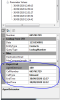
Parametros 3cx.PNG

Dentro del generador de plantillas, cuando en "Parameter Values" Hago click derecho "Report Call", Se que el número de teléfono se envia por get, pero ¿Como se envian los campos que marco en la imagen?

Un saludo
 
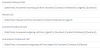
Se envían usando el string configurado en la central en la sección de call journaling

Sería algo como esto

1601465968369.png

Cuando termines de generar la plantilla y la cargues en la central lo podrás observar...

Step 7 - Configure the Call Journaling Scenario
Add a Scenario to create tickets in your CRM when a call ends:

  • Change the Scenario Id to ReportCall
  • To avoid the scenario execution when the feature is disabled, set the SkipIf expression to [ReportCallEnabled]!=True
  • Set Request Type to Post
  • Enter the URL: https://[Domain].example.kom/api/v2/tickets
  • Set the request encoding type to JSON
  • Set the response type to JSON
Now we need to specify the Post data. This cannot be done from the tool, so save the changes, close the tool and open the template XML file using a text editor. See the <Scenario Id="ReportCall" element in the example CRM template for reference.

The XML structure inside the <PostValues> element is converted to a JSON object, i.e.:

{

requester_id: 1234,

phone: "+15551234567",

subject: "New Ticket",

status: 2,

priority: 1,

description: "03/12/2018: Answered incoming call from +15551234567 John Doe to 100 (5:32)",

source: 3,

tags: [

"Inbound",

"Call",

"100"

]

}

Please note:

  • The value used for requester_id is taken from the variable [Contact::ContactId]. Here, you can use any contact lookup output value.
  • The values “subject” and “description” have the attribute Passes="2", and double brackets in variables [[Subject]] and [[InboundCallText]]. That means that the expression needs to be evaluated twice. The first time, the engine gets the values from variables [Subject] and [InboundCallText], and then it evaluates again what was returned by them. So, for example for the description:
  • First pass: [[InboundCallText]] >> [DateTime]: Answered incoming call from [Number] [Name] to [Agent] ([Duration])
  • Second pass: [DateTime]: Answered incoming call from [Number] [Name] to [Agent] ([Duration]) >> 03/12/2018: Answered incoming call from +15551234567 John Doe to 100 (5:32)
  • The value “description” is present 4 times. But the “If” attribute works as a selector, resulting in 3 of them not being generated as output.
  • This scenario does not have any Variable or Output, as it does not need to return any information to 3CX.
Save the changes to the XML and open the 3CX Template Generator tool.
 
Status
Cerrado para nuevas respuestas.

Estadísticas del Foro

Temas
44.439
Mensajes
232.807
Miembros
78.338
Último miembro
neil.marsura